
On this page I will share with you all the eBooks I have written. Only one for now, but everyone has to start somewhere :)
Capturing fireworks – what you need to capture fireworks, camera settings and more



Free HDR video tutorial
MASTER EXPOSURE BLENDING

Find the best ones
TOP PHOTOGRAPHY SPOTS

Free wallpapers
HIGH-RESOLUTION WALLPAPERS
On this page I will share with you all the eBooks I have written. Only one for now, but everyone has to start somewhere :)
Capturing fireworks – what you need to capture fireworks, camera settings and more
Because of the New years, I missed this weeks processing post. But to correct this, there will be one today. And from next week, it will get back to a processing post every Tuesday. So for today I chosen a photo from Paris, taken from the Tour Montparnasse.

So to get this photo, I as always started in Lightroom. I corrected the white balance and the crooked horizon. After that I exported all the files as 16bit Tiffs and loaded them into Oloneo Photoengine. There I only changed the strength, as that’s all I needed. Using Bridge, I then loaded all the files into layers in Photoshop. From there I did the following tweaks (layers numbered from bottom up):
1. Oloneo Photoengine result
2. 0EV exposure to recover the shadows using a hand-painted mask
3. -2EV exposure to darken the sky even more
4. Color Efex pro contrast, to get more local contrast in the image. Of course I removed the effect from the clouds
5. Color balance on the whole image, as it was too purple
6. High Pass sharpening
7. Added more contrast through a basic midtones mask
8. Desaturated the blue channel on the most saturated areas
9. A little more pro contrast, I felt like I need more detail in the city
10. Added contrast by using curves
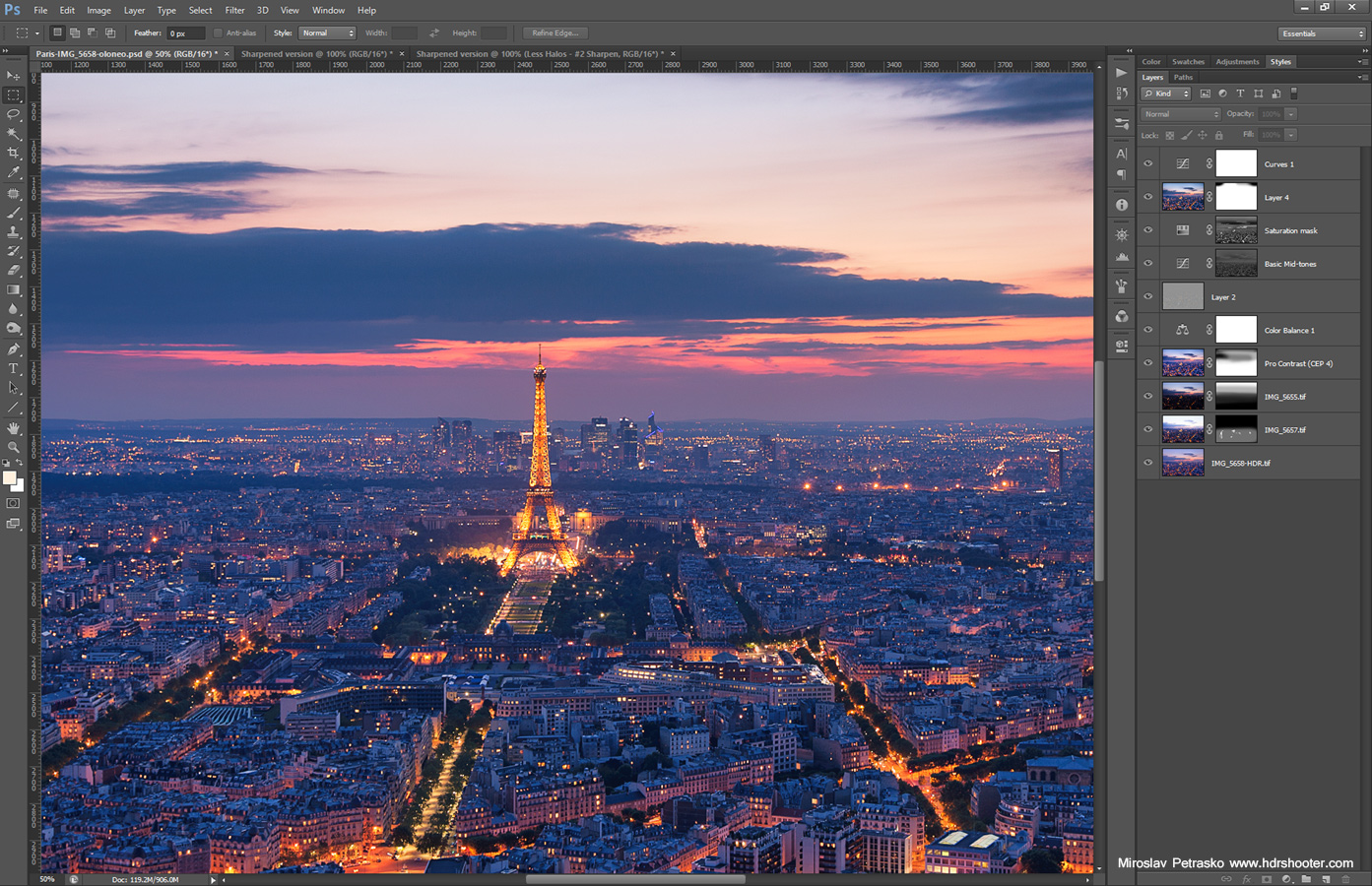
And that was all. Please continue to the full post to see the 0EV exposure and the Oloneo result or to the original blog post to see the exif info for this image.

It was quite a surprise when I checked the selection for the 2013 at Photoblogawards. I have been selected for the 2nd year in a row, this time as the best in HDR photography. I have to say big thanks for all your support through last year, visits, shares, comments and everything else. Let’s now hope for an even better 2014 :)
I thought about what to post today, and since I slept most of today (I was just too tired from the last few days), I chosen to stick with another fireworks shot :) You can see in this photo, what I mentioned yesterday, with the smoke covering the castle. Few moments after this, you could not see it anymore :)
This is a single exposure edited in Lightroom and Photoshop.

First of all happy new year everyone, hope you having a great time. I, same as every year, went out to get some photos of the midnight fireworks. I got quite a good spot this year, but the weather was a little bad. The fog with the smoke from the fireworks actually covered the castle completely, that in the middle of the fireworks I moved to a different spot, as my planed composition with the castle was not possible at all. You just could not see it. But this is one from the start, so it’s still there.
This is a single exposure edited in Lightroom and Photoshop.

I’m ending the year the same way as I started it, with a photo of fireworks. Of course these are the ones form last year, as I have no new ones yet. Maybe tomorrow, if the weather gets better (it’s raining right now ). Hope you all have a great day today, and to a better 2014 :)
This is a single photo edited in Lightroom and Photoshop.


